Let’s be honest: most pathology labs are drowning in slides.
You’ve got decades of cases stacked in aging cabinets, new specimens arriving daily, and a surgeon calling for a 12-year-old slide “ASAP.” Meanwhile, your storage room is overflowing, your staff are juggling retrieval requests between sign-outs, and an accreditation audit is scheduled for next month.
Choosing a slide archiving system isn’t about buying metal shelves—it’s about solving real operational headaches: lost slides, delayed reports, compliance gaps, and wasted labor hours.
After speaking with lab managers across academic hospitals, community clinics, and reference labs, one thing is clear: the best systems aren’t the flashiest—they’re the ones that disappear into your workflow while keeping every slide findable, protected, and traceable.
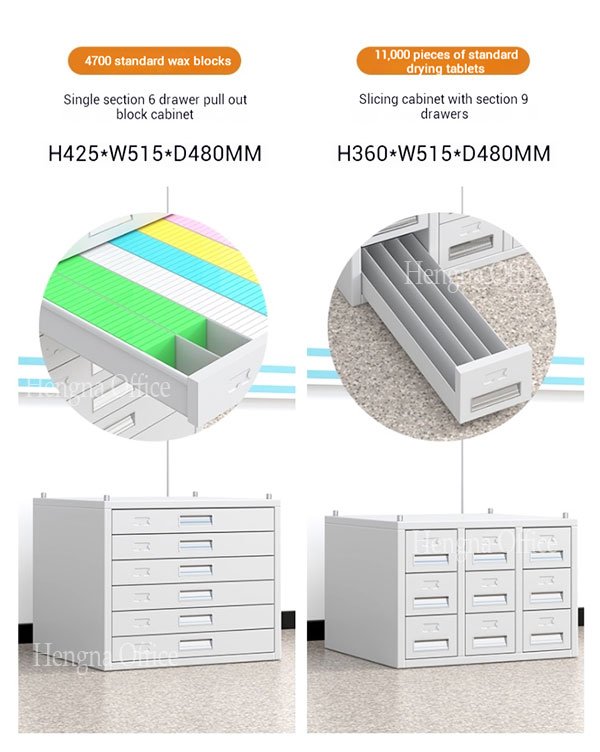
Here are the five practical factors that actually move the needle—no marketing fluff, just what impacts your day-to-day.How to Choose the Right Pathology Slide Archiving System?
1. It Has to Fit—Now and in Five Years
Don’t just measure your walls—measure your growth trajectory.
Many labs pick a system based on today’s volume, only to outgrow it within two years. Suddenly, you’re stacking boxes in hallways or renting off-site storage (which defeats the purpose of quick access).
Ask:
- How many slides do we add per year?
- Can this system expand without a full rebuild?
- Does it support a hybrid physical/digital future?
Look for modular designs—like mobile shelving units or stackable carousels—that let you scale incrementally. If you manage over 50,000 slides, consider high-density or semi-automated options early. Retrofitting later costs far more than planning ahead.
Pro Tip: High-density mobile shelving can double your storage capacity in the same footprint—ideal for space-constrained labs.
2. Retrieval Speed = Diagnostic Speed
If it takes 8 minutes to find a slide, that’s 8 minutes a pathologist isn’t diagnosing. In busy labs, retrieval delays cascade into report backlogs and clinician frustration.
| System Type | Avg. Retrieval Time | Best For |
|---|---|---|
| Manual Cabinets | 3–10 minutes | Small labs (<5,000 slides) |
| Carousel Systems | 30–90 seconds | Mid-sized hospital labs |
| Robotic Archives | <30 seconds | Large academic/reference labs |
The key isn’t automation for its own sake—it’s consistency.
Ensure your system supports:
- Barcode scanning tied to your LIS
- Logical organization (e.g., by accession number blocks)
- Ergonomic access—no climbing or squatting
Avoid setups that rely on memory or handwritten logs. One misfiled case can trigger a 30-minute search.
3. Protect the Specimen—Not Just the Space
Slides aren’t paper files. They’re irreplaceable diagnostic assets.
We’ve seen faded H&Es from UV exposure, moldy coverslips in humid basements, and shattered glass from flimsy trays.
A good archive preserves integrity, not just stores inventory. Look for:
- Sealed or gasketed drawers to block dust
- Non-reactive, anti-static materials
- Stable internal microclimate (ideally 18–22°C, 40–60% RH)
Did You Know? Humidity above 70% can cause fungal growth on tissue sections—permanently compromising diagnostic value.
Avoid open wire racks for long-term storage. Short-term? Maybe. But archives demand containment.
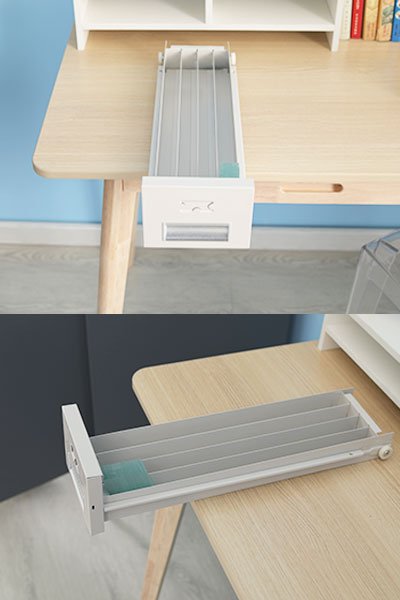
4. Pass Audits Without Panic
CAP, CLIA, ISO 15189—they all require proof you know where every slide is and who accessed it.
If your system depends on sticky notes or tribal knowledge, you’re already non-compliant.
The best setups make compliance automatic:
- Every slide has a scannable ID linked to your LIS
- Retrieval logs are digital and time-stamped
- Physical access is restricted to authorized personnel
Best Practice: Choose vendors who provide IQ/OQ/PQ validation documentation. It saves weeks of internal validation work during audits.
5. Calculate the Real Cost—Not Just the Price Tag
That $8,000 cabinet might seem like a bargain—until you factor in:
- 2+ hours/week of staff time hunting misfiled slides
- Lost productivity during peak retrieval periods
- Replacing damaged trays every 18 months
Total Cost of Ownership (TCO) includes:
- Initial purchase & installation
- Staff labor for filing/retrieval
- Maintenance contracts
- Space utilization (high-density vs. open shelving)
- Future upgrade path to digital pathology
One reference lab switched to a mid-tier carousel system and cut retrieval labor by 60%. Their ROI? Under 18 months.
Bonus: Build for Digital—Even If You’re Not There Yet
You don’t need to go fully digital tomorrow. But your physical archive shouldn’t block that future.
Choose a system that:
- Leaves room for slide scanners nearby
- Uses the same accession logic as your digital platform
- Doesn’t lock you into proprietary formats
Trend Alert: Over 60% of U.S. academic medical centers plan full digital pathology adoption by 2027 (CAP Survey, 2024). Don’t invest in an analog-only dead end.
Final Checklist Before You Buy
Before signing a contract, ask:
- Can it scale to 2x our current volume?
- Does retrieval take <2 min (manual) or <30 sec (automated)?
- Are slides protected from dust, moisture, and breakage?
- Is it CAP/CLIA/ISO-compliant out of the box?
- Does it integrate with our existing LIS?
- Is ROI achievable within 3 years?
Bottom Line
The right slide archiving system doesn’t draw attention—it enables accuracy, efficiency, and peace of mind. Focus on what matters: access speed, specimen protection, scalability, compliance, and true cost. Ignore features that sound impressive but don’t solve your actual problems.
Talk to vendors—but also ask for customer references in labs like yours. See the system in action. Watch how long it takes them to pull a random case from 2015.
Because in pathology, the past isn’t just history. It’s often the key to the diagnosis.